The CryptKi Academy
How to use a hardware wallet (setup and daily use)
Security depends on daily behaviour
The first thing most people notice about a hardware wallet is the friction. There is a physical device to connect, a screen to read, a button to press. Compared to a software wallet, every action takes a little longer.
That slowness is the point. Hardware wallets are built around the idea that critical decisions should require deliberate physical input, not because speed is the enemy, but because the moment of signing is the moment that matters, and it should feel like one.
Understanding how hardware wallets are used helps clarify what that friction actually protects, and where it stops.
What changes with a hardware wallet
A hardware wallet does not change how blockchains work. Transactions follow the same rules. Confirmations behave the same way. The network has no idea what kind of device produced a signature.
What changes is where keys live. With a hardware wallet, keys are generated and stored inside the device. They are never exposed to the computer or phone used to prepare a transaction. That separation is the core of what a hardware wallet provides. Everything else follows from it.
Initial setup
During setup, the hardware wallet generates cryptographic keys internally and displays recovery information. This is the step that defines future access, not just to the device, but to the funds associated with those keys.
No confirmation is sent to the network, and no record exists outside the device and its backup. Mistakes made here can remain invisible until recovery is needed.
Understanding Keys, addresses, and seed phrases helps explain what is being created during setup, while Storing your recovery phrase securely explores how that recovery material should be protected.
Preparing a transaction
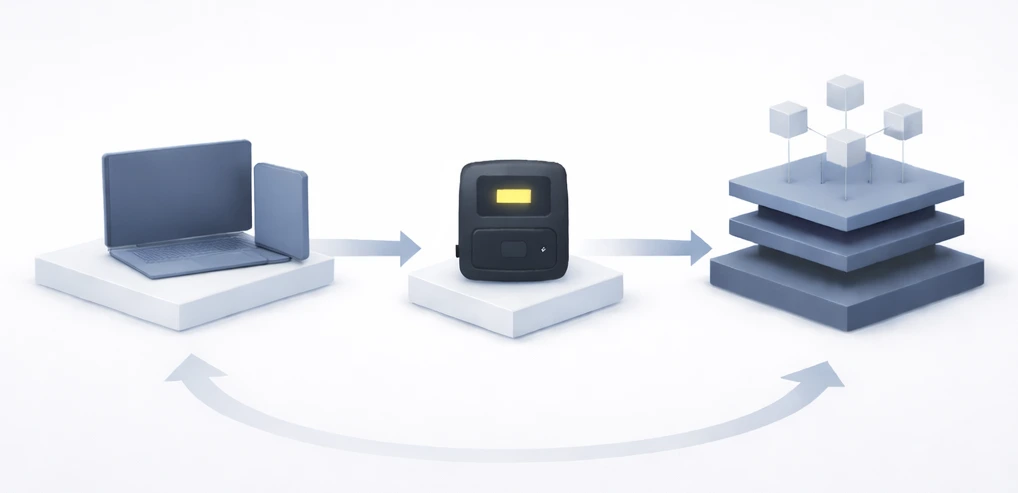
In daily use, transactions are prepared on a connected computer or phone. The wallet software constructs the instruction, including amounts, destinations, and contract interactions, but at this stage, the hardware wallet has not yet been involved, and the private keys remain untouched. The transaction exists only as a proposal.
For practical transaction handling, see How to send and receive crypto safely.
Verification and signing
The prepared transaction is sent to the hardware wallet. The device displays what will be signed, independently, on its own screen, not on the connected computer.
This is where the separation becomes practical. The user reads the details on the hardware wallet's display and confirms them physically. If something has been altered in transit, this is the moment to catch it. Once confirmed, the device produces a signature. The private keys never leave the device.
This verification step matters not only for transfers, but also for smart-contract interactions and permissions. Approvals and permissions: what you sign in DeFi explains why reviewing signing requests carefully is essential.
Broadcasting and confirmation
Once signed, the transaction is returned to the connected device and broadcast to the network. From that point, the process is identical to any other transaction. Confirmations accumulate and irreversibility applies.
The hardware wallet played no part in that final stage. Its role ended at signing.
Limits of hardware wallets
Hardware wallets reduce exposure. They do not remove responsibility.
The device enforces isolation, not judgement. It will sign whatever the user confirms. It does not evaluate whether the outcome was intended, expected, or accidental. If the details displayed are wrong and the user approves them, the transaction proceeds. If recovery material is lost, access is lost.
What a hardware wallet cannot do is protect against its own user confirming the wrong thing. That part remains entirely human.
Hardware wallets also depend on the security of the systems around them. Securing your computer and phone for crypto use explains how to reduce risks on connected devices.
Why daily interaction matters more than setup
Setup establishes authority. Daily use is where that authority is actually exercised, repeatedly, routinely, often without much thought.
Each interaction follows the same mechanism: data prepared externally, verified internally, signed physically. The protocol treats every signature identically. It does not know whether a transaction was reviewed carefully or confirmed in a hurry.
The device provides isolation. What happens during verification, the few seconds between seeing the details and pressing confirm, is where most of the remaining risk lives.

Key takeaways
- Hardware wallets keep keys isolated from connected systems.
- Setup defines future access, and the network records nothing about it.
- Transactions are prepared externally and signed internally, on a separate screen.
- Physical confirmation adds deliberate friction at the moment that matters.
- Isolation reduces exposure, not consequences.
Find out more
-
Hardware wallets: how they work
revisits why isolation matters. -
Using your wallet safely: daily practices and common mistakes
focuses on habits during daily interaction. -
Backup and recovery: restore safely (scenarios and traps)
explores how recovery material should be handled. -
Storing your recovery phrase securely
covers long-term protection of recovery information. -
How to send and receive crypto safely
provides practical guidance for routine transactions. -
Comparing hardware wallets: criteria that matter
explores the differences between devices and the features that matter most. -
How to structure your crypto setup and reduce your exposure
helps build a safer overall security model.
CryptKi Academy full index - Browse all articles
Some tools exist to help manage private keys.
If you want to see concrete examples, you can explore our shop.